


Skip to content
View in the app

A better way to browse. Learn more.

iBotModz

A full-screen app on your home screen with push notifications, badges and more.

To install this app on iOS and iPadOS
  1. Tap the Share icon in Safari
  2. Scroll the menu and tap Add to Home Screen.
  3. Tap Add in the top-right corner.
To install this app on Android
  1. Tap the 3-dot menu (⋮) in the top-right corner of the browser.
  2. Tap Add to Home screen or Install app.
  3. Confirm by tapping Install.

wxRipper & wx360

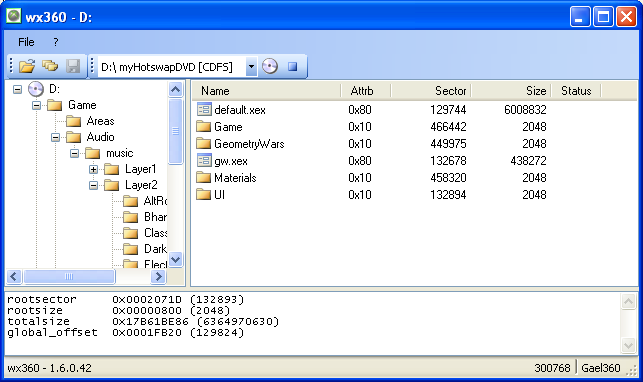
1 Screenshot

wxRipper & wx360

Gael360


This tools will help you to raw dump retail Xbox 360 discs on a PC DVD-drive with a hot-swap method (means you'll have to open your drive)


I just released a big update of my tools, you will now be able to find the 'magic number' immediatly, without having to scan an unknown Xbox 360 DVD. So there's no longer a difference between known and unknown games, they will all be detected/dumped the same way.


The advantage of this method is that you will be able to use wx360 directly to open the content of the DVD without having to dump it first. After doing the hot-swap you'll just have to open wx360, select the DVD-drive and click the DVD icon.


wxRipper will thus have a feature to find the 'magic number' immediately, without scanning the Xbox 360 DVD. The features related to dumping did not change.


Screenshot:


http://i43.tinypic.com/209n1ja.png

What's New in Version 06/05/12 05:06 PM

Released

No changelog available for this version.

With version 06/05/12 05:06 PM:

Account

Navigation

Search

Search

Configure browser push notifications

Chrome (Android)
  1. Tap the lock icon next to the address bar.
  2. Tap Permissions → Notifications.
  3. Adjust your preference.
Chrome (Desktop)
  1. Click the padlock icon in the address bar.
  2. Select Site settings.
  3. Find Notifications and adjust your preference.