

 0
0
Once your video is done go to
"Render As..."
Change the type to
"MPEG-2"
and if you have pre-defined templates use "HDV- 1080-50i"
Otherwise go to the custom button and use these settings.
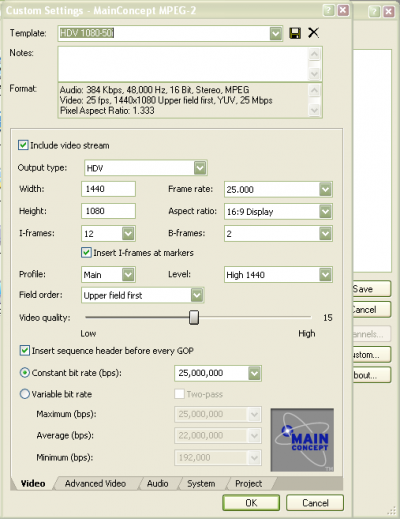
Or the text version:
Audio: 384 Kbps, 48,000 Hz, 16 Bit, Stereo, MPEG
Video: 25 fps, 1440x1080 Upper field first, YUV, 25 Mbps
Pixel Aspect Ratio: 1.333
Everything else default. This will allow for optimal YouTube videos with filesizes less than 500mb that can go up to 4 minutes, with amazing quality.
"Render As..."
Change the type to
"MPEG-2"
and if you have pre-defined templates use "HDV- 1080-50i"
Otherwise go to the custom button and use these settings.
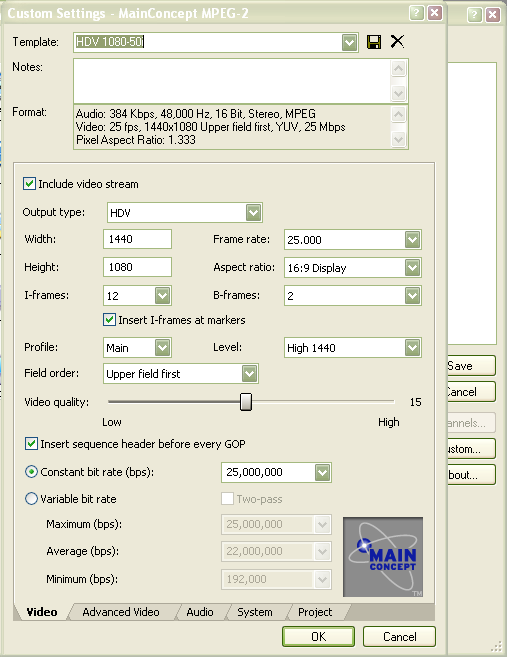
Or the text version:
Audio: 384 Kbps, 48,000 Hz, 16 Bit, Stereo, MPEG
Video: 25 fps, 1440x1080 Upper field first, YUV, 25 Mbps
Pixel Aspect Ratio: 1.333
Everything else default. This will allow for optimal YouTube videos with filesizes less than 500mb that can go up to 4 minutes, with amazing quality.


